
If you have been shopping for a new high-end TV in the last few years, you have undoubtedly heard the praise sung for OLED (Organic Light-Emitting Diode) technology.
It offers perfect blacks, infinite contrast, and vibrant colors that pop off the screen. It is, by most metrics, the gold standard for picture quality today.
But you have probably also heard the whisper in the back of the room—the boogeyman of the display world: Burn-in.
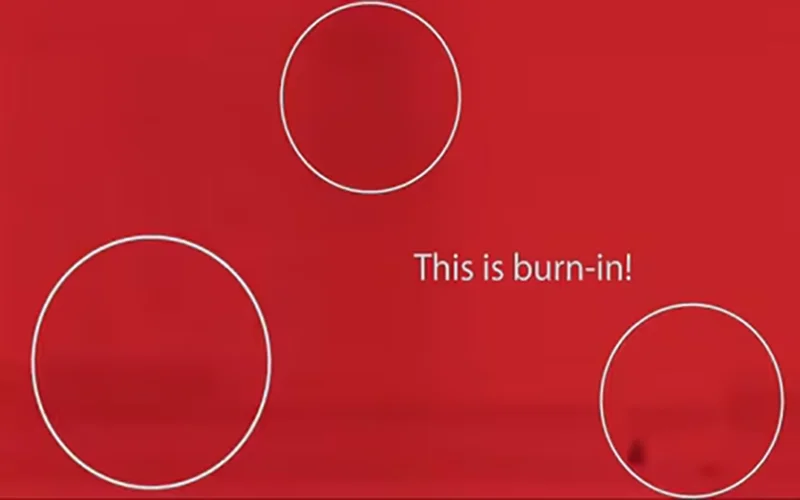
It is the one hesitation that stops many buyers from taking the plunge. But is this fear still justified in 2026?
As someone who has tested hundreds of displays, from the earliest plasmas to the latest QD-OLEDs, I am here to break down exactly what burn-in is, the science behind it, and whether you actually need to worry about it.
What Exactly Is "Burn-In"?
In the simplest terms, burn-in is permanent image retention. It appears as a visible ghost or shadow of a static image that remains on the screen even when you are watching something else.
Imagine watching a news channel with a bright red "Breaking News" banner at the bottom for 10 hours a day, every day.
Eventually, when you switch to a movie with a uniform grey or white background, you might still see the faint outline of that "Breaking News" banner. That is burn-in.
Image Retention vs. Burn-In
It is crucial to distinguish between two terms often used interchangeably:
Temporary Image Retention:
This is a short-term "ghost" image. For example, if you leave a bright menu on screen for 10 minutes and then switch it off, you might see a faint outline for a few moments. This goes away after a few minutes of watching other content. This is common and harmless.
Burn-In:
This is permanent. No amount of waiting or power-cycling will fix it. It is physical degradation of the pixels.
To understand why OLEDs are susceptible to this, we have to look at the "O" in OLED: Organic.
Unlike LCD/LED TVs, which use a backlight to shine through pixels, OLED pixels are self-emissive. Each individual pixel generates its own light. Over time, the organic compounds that create this light degrade and lose their efficiency. They get dimmer the more you use them.
The Science: Why Does Burn-In Happen?
The Candle Analogy
Think of the millions of pixels in your OLED TV as millions of tiny candles.
- If you light all the candles at the same time and let them burn at the same speed, they will all get shorter (dimmer) together. The picture remains uniform.
- However, if you burn just *one* cluster of candles (say, in the shape of a news network logo) much hotter and longer than the rest, those specific candles will burn down faster.
- When you try to light the whole room up evenly later, that specific cluster will be shorter (dimmer) than the surrounding candles. That dark patch is what your eye perceives as burn-in.
This is technically called differential aging. It isn't that the image is "burned" onto the screen; it's that those specific pixels have aged prematurely compared to their neighbors.
For the Average Viewer
If you watch a mix of content—movies, TV shows, some sports, and a bit of casual gaming — your risk of burn-in is extremely low. Modern OLED panels have evolved significantly. I have reviewed units that have logged thousands of hours of mixed usage with zero signs of degradation.
For the "Power User"
You fall into the "risk" category if you:
- Watch a single news channel (like CNN or Fox News) with a static ticker for 6+ hours every single day.
- Use your OLED TV as a PC monitor with a static taskbar and desktop icons visible all day.
- Play the *exact same* video game (with a bright, static HUD or health bar) for 4-8 hours a day, every day, for months on end.
Even for these users, it takes a long time for damage to occur, but the risk is non-zero.
The Reality Check: Should You Be Worried?
This is the million-dollar question.
The short answer is: Probably not, but it depends on how you use your TV.
How Manufacturers Are Fighting Back
TV manufacturers (like LG, Sony, and Samsung) know this is a concern, and they have implemented sophisticated tech to prevent it.
Pixel Shift:
The TV imperceptibly moves the entire image slightly to the left, right, up, or down every few minutes. This ensures that the borders of static logos aren't hitting the exact same sub-pixels constantly.
Logo Luminance Adjustment:
The TV's processor can detect static objects (like channel logos or scoreboards) and automatically dim *just that specific area* without dimming the rest of the picture.
Heatsinks:
Premium OLED models now come with physical heatsinks (metal plates behind the panel) that dissipate heat. Heat is the enemy of organic materials; cooler panels degrade much slower and can get brighter with less risk.
Automatic Pixel Refresher:
When you turn off your TV after a long session, it doesn't actually turn off immediately. It runs a maintenance cycle to scan the voltage of the pixels and equalize them, effectively "wiping" temporary retention and smoothing out wear.
Currently, there are two main types of OLED tech:
WOLED (White OLED):
Used primarily by LG. It uses a white sub-pixel to boost brightness.
QD-OLED (Quantum Dot OLED):
Used by Samsung and Sony. It uses blue OLEDs with Quantum Dot layers to create colors.
Early tests suggest that QD-OLED, because it drives its pixels harder to achieve higher brightness without a white sub-pixel, *might* be slightly more susceptible to burn-in under extreme stress tests.
However, WOLED has a longer track record of durability. For the average user, the difference is negligible, but for a heavy monitor user, WOLED might currently have a slight edge in longevity.
WOLED vs. QD-OLED: Is One Safer?
5 Tips to Protect Your Investment
If you buy an OLED (and you should—the picture quality is worth it), follow these simple habits to ensure it lasts for years:
The Golden Rule:
Variety is the spice of life—and the savior of your OLED. As long as you vary your content, your panel will likely outlast your desire to keep the TV.
- Don't Unplug It: Never unplug the TV from the wall immediately after turning it off. Let it run its background compensation cycles (you will usually hear a click when it's fully done).
- Use "Screen Shift" Features: Ensure all built-in protection settings (Pixel Shift, Screen Move, Logo Dimming) are set to "On" or "High."
- Lower the Brightness: You don't need 100% brightness in a dark room. Running the panel at 60-80% brightness significantly reduces the stress on the organic pixels.
- Hide Static Elements: If you game or use a PC, turn off HUDs (Heads Up Displays) where possible, or set your taskbar to "auto-hide."
- Enable Screen Savers: Most smart TVs do this automatically, but ensure your external devices (Apple TV, PS5, Xbox) are set to dim or activate a screensaver after 2-5 minutes of inactivity.
Is burn-in real? Yes.
Should it stop you from buying an OLED? No.
The fear of burn-in is largely a hangover from the early days of the technology (and the Plasma era before it).
Modern panels are robust, intelligent, and designed to handle typical living room usage with ease. Unless you are running a 24/7 airport arrival screen or are a professional streamer playing the same game 10 hours a day, the unparalleled picture quality of OLED is well worth the minimal risk.
Buy the TV, enjoy the perfect blacks, and stop worrying about the ghost in the machine.