
65-Inch OLED vs 75-Inch Mini LED: Which Should You Buy?
Quick Verdict
Choose a 65-inch OLED if you sit roughly 6.5–8 feet away, mostly watch movies at night, and care about deep blacks and clean subtitles. Choose a good 75-inch Mini LED if your couch is closer to 9–10 feet away and a larger picture matters more than eliminating every backlight halo.
At about 8 feet, either size can work well. That’s where your lighting, seating layout, and tolerance for blooming should settle the decision. A 75-inch screen has about 33% more picture area than a 65-inch screen, so the size difference is substantial.
This guide compares two ways to spend your TV budget. For a deeper explanation of the display technologies, see our OLED vs Mini LED guide.
U.S. model note: The examples below are the LG OLED65C5PUA and TCL 75QM6K. LG sells the same C5 family in the UK with codes such as OLED65C54LA; local model suffixes and support arrangements differ. TCL’s European C6K should not be treated as an interchangeable U.S. QM6K without checking the exact regional specifications.
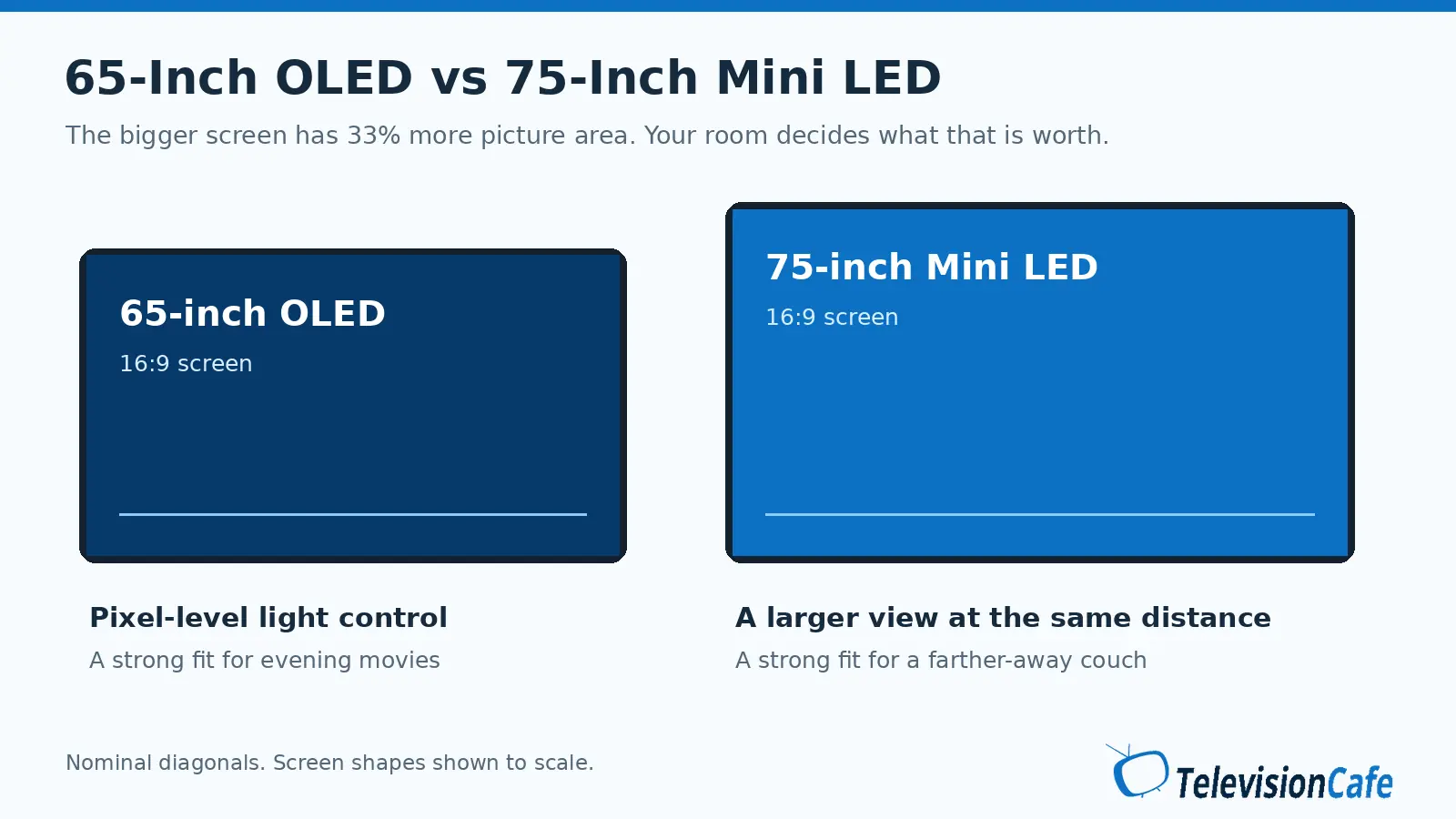
How Much Bigger Is a 75-Inch TV?
The extra 10 inches describe the diagonal. With the same 16:9 shape, a 75-inch screen is about 15.4% wider and taller, which adds up to 33.1% more screen area. Faces, scoreboards, landscapes, and subtitles all look larger from the same seat.
| Screen measurement | 65-inch | 75-inch |
|---|---|---|
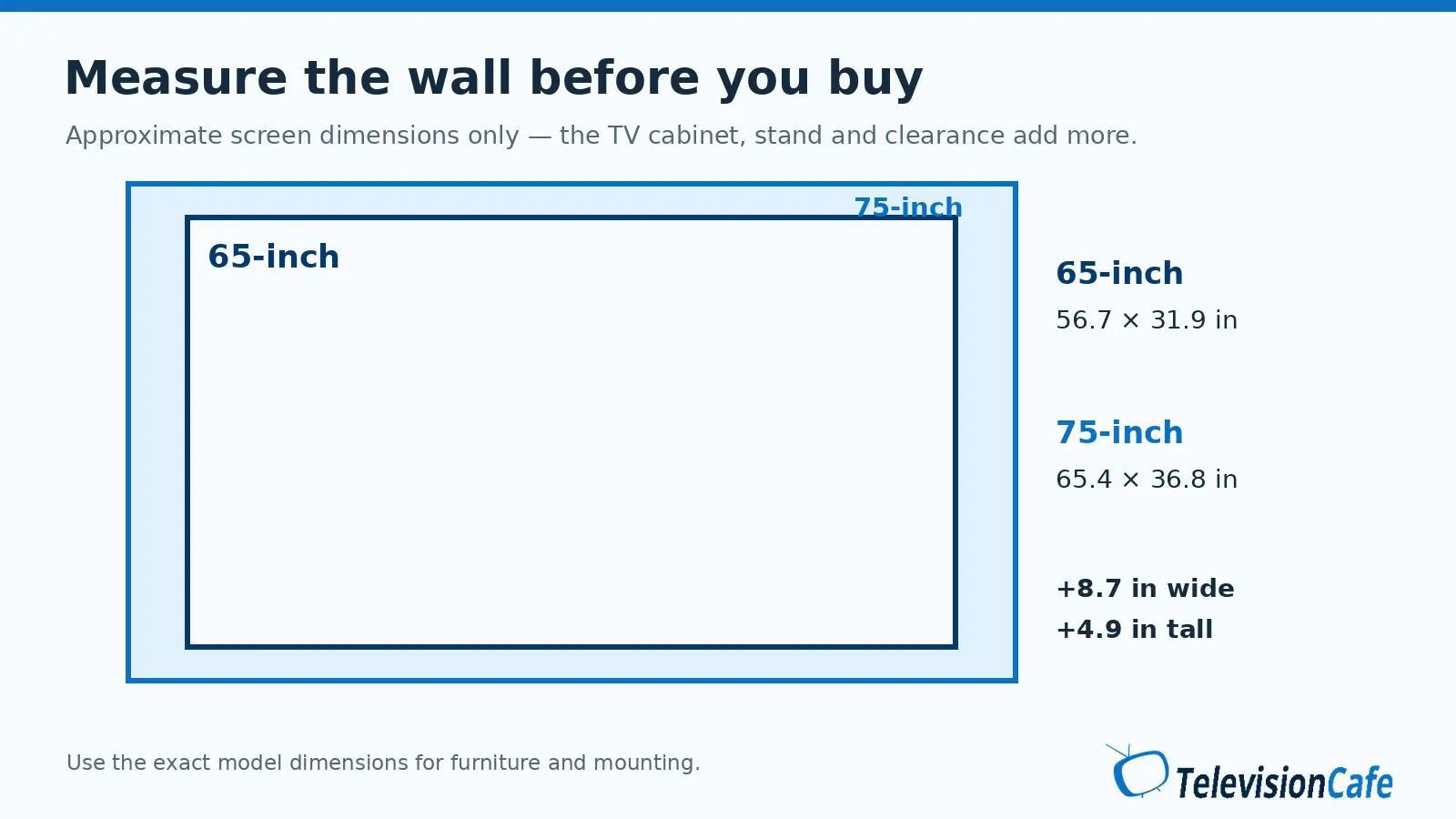
| Approximate width | 56.7 inches | 65.4 inches |
| Approximate height | 31.9 inches | 36.8 inches |
| Relative screen area | 100% | 133% |
These are calculated screen dimensions using nominal diagonals, not the outside dimensions of a particular TV. Bezels, feet, and the TV’s actual viewable diagonal change the final measurements.
Both can be 4K. The larger screen makes the image bigger; it doesn’t add detail to the source. It can also make compression and soft cable broadcasts easier to notice. If those are your main sources, check processing performance as well as screen size.
Start With Your Viewing Distance
Measure from your eyes in your normal seat to the screen. The distance from one wall to the other isn’t the useful number.
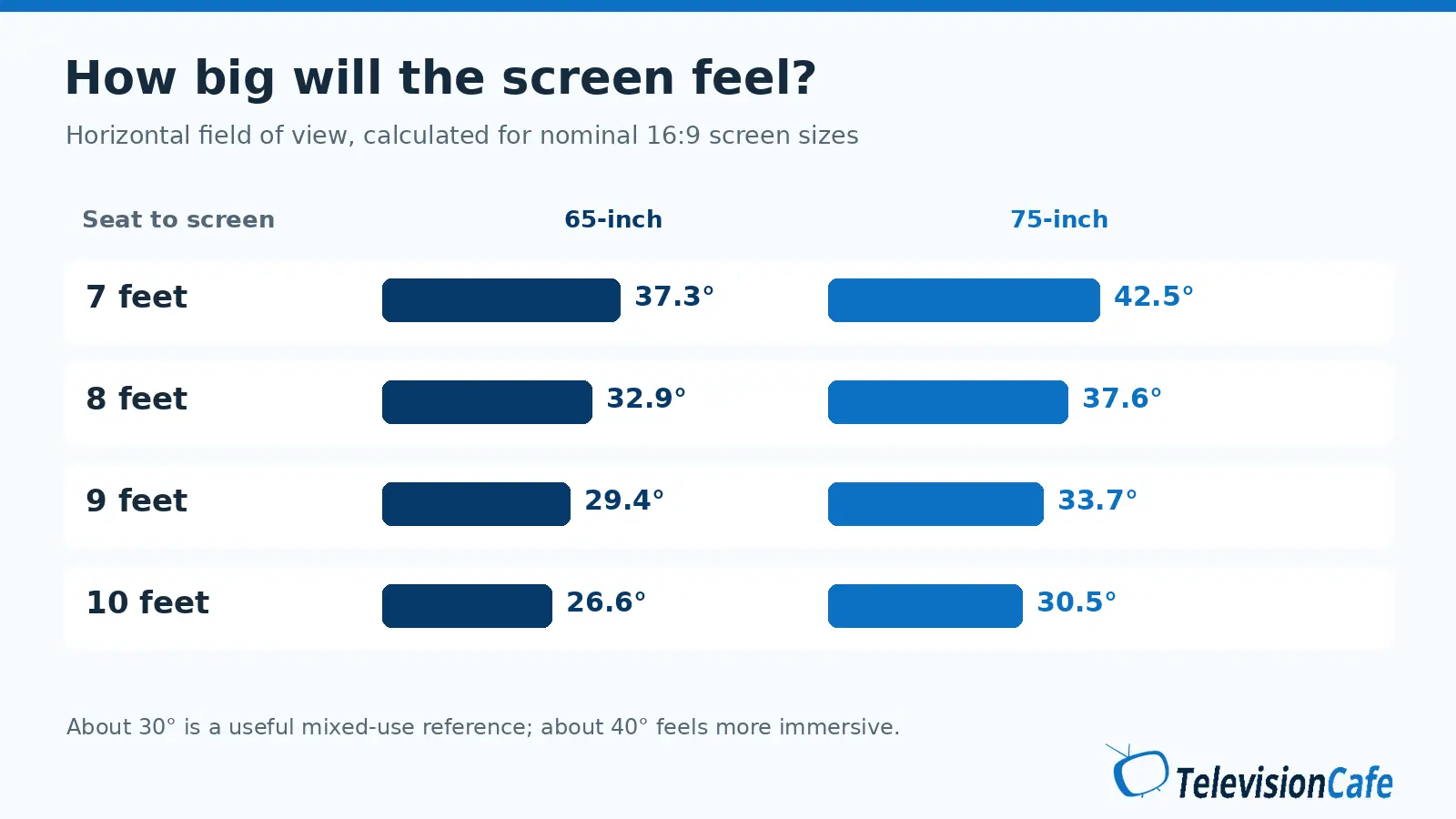
RTINGS uses roughly a 30-degree horizontal field of view as a mixed-use reference and 40 degrees for a more immersive movie experience. Using nominal 16:9 dimensions, that puts a 65-inch screen at about 6.5–8.8 feet and a 75-inch screen at about 7.5–10.2 feet. These are starting points, not comfort limits.
| Your seat | What we’d prioritize |
|---|---|
| Around 7 feet | 65-inch OLED for evening viewing; try 75 inches first if you want a very large image. |
| Around 8 feet | The closest call. Choose contrast for dark-room movies or size for sports and immersion. |
| Around 9–10 feet | 75-inch Mini LED, provided the exact model meets your picture and gaming needs. |
A useful test: move your seat closer to an existing 65-inch TV by about 13%. A 65-inch screen at roughly 7.8 feet occupies the same viewing angle as a 75-inch screen at 9 feet. This previews the change in apparent size without buying anything. Our TV size guide covers more room layouts.
When the 65-Inch OLED Makes More Sense
For evening movies, OLED’s main advantage is precise light control. Each pixel produces its own light, so a bright subtitle can sit against black without a local-dimming backlight lighting up the area around it.
If glowing subtitles, star fields, or gray-looking letterbox bars pull you out of a movie, giving up 10 inches can be worthwhile. This is especially persuasive when a 65-inch screen already fills enough of your view.
OLED also deserves a close look for a wide sectional. Many Mini LED TVs use LCD panels that lose contrast and color consistency from the side. The exact panel and any viewing-angle layer matter; simply buying the larger screen won’t fix an off-center picture.
There’s a motion trade-off. OLED’s fast pixel response can make the separate frames of a 24 fps movie more obvious during slow camera pans. RTINGS’ stutter testing explains this relationship. A little motion smoothing may help, but heavy interpolation can change the look of a film.
When the 75-Inch Mini LED Makes More Sense
At a longer seating distance, the larger image can make a football field easier to follow and a movie feel less distant. Those benefits are there even when the content doesn’t show off the TV’s deepest blacks.
A capable Mini LED is also worth considering for lots of daytime viewing. Many models sustain bright, large picture areas well, which helps with sports and other bright content. But the Mini LED label alone doesn’t establish brightness or reflection performance.
Check the exact model’s SDR brightness and direct-reflection tests. A bright window reflected in the middle of the picture can remain distracting on a powerful TV. Curtains, a different screen position, or moving a lamp may help more than paying for a higher peak-brightness specification.
The compromise is local dimming. Some models show halos, dim small highlights, or change brightness as objects move between zones. A higher zone count isn’t a guarantee of better control. Our guide to TV blooming shows what to look for.
Sports and Gaming: Check More Than Size
For sports, start with the seats and the feed
A 75-inch Mini LED is an appealing choice for a group sitting 9 or 10 feet away. If friends sit far off to the sides, though, viewing angles may outweigh the larger screen. Also check gray uniformity: blotches or darker bands can be distracting as the camera pans across a field.
Picture processing and the broadcast matter, too. A heavily compressed sports stream won’t become clean 4K because the television is bigger. Use our sports TV guide to narrow the model choice after deciding on size.
For gaming, separate motion clarity from input lag
OLED’s fast pixel transitions can keep moving edges clear. Input lag is a different measurement: the delay before a control input appears on screen. A Mini LED can have low input lag, so don’t use panel technology as a substitute for a Game Mode test.
For a PS5 or Xbox Series X, verify 4K at 120Hz and VRR support on the inputs you’ll use. Count the ports left after connecting an eARC soundbar. Also look at HDR and local-dimming behavior in Game Mode, since picture performance can change when low-latency settings are enabled.
A 75-inch screen can be rewarding for racing and story-driven games from a couch. At closer range, make sure you can comfortably see the corners and HUD. For long daily desktop sessions or repeated static graphics, Mini LED avoids OLED’s particular risk of permanent burn-in. Mixed TV and game use is a different workload; keep the OLED’s protection features enabled and follow the manufacturer’s care instructions.
Compare the Actual TVs, Then the Price
A discounted 65-inch OLED and a budget 75-inch Mini LED can be very different products beyond their panel type. Compare picture processing, HDMI support, reflections, and the return policy before treating them as equivalent choices.
65-inch OLED example: LG C5
The U.S. LG OLED65C5PUA supports Dolby Vision and up to 4K at 144Hz with a compatible PC, according to LG. In its test of the 65-inch C5, RTINGS found wide viewing angles, strong dark-room performance, and good handling of lower-quality content. Direct reflections and movie stutter remain considerations. Those findings make it a useful example of why someone might choose the smaller screen.
75-inch Mini LED example: TCL QM6K
TCL lists 144Hz and VRR support for the U.S. 75QM6K. RTINGS tested the 75-inch QM6K and found low input lag and useful SDR brightness, while noting limited HDR impact and visible haloing. It illustrates why moving up in size can make sense without assuming you’re also getting stronger HDR highlights than an OLED.
Read our LG C5 review and TCL QM6K review for more context. These are examples of the trade-off, not a claim that they currently cost the same.
Set a price gap you can justify
Suppose your two finalists cost $1,300 and $1,000. That’s an illustrative $300 difference, not a live offer. Ask what you’d gain for that money in your room: fewer distracting halos every night, a noticeably larger image from the couch, or neither.
If the 65-inch image already feels too small, paying more for better blacks won’t make it bigger. If you sit close and mostly watch in the dark, paying extra for size may leave you wishing you’d chosen OLED. And if both size and OLED contrast are essential, compare the cost of a 77-inch OLED before compromising. Budget for the stand or mount and delivery as well as the TV.
Check the Fit Before Ordering
Use painter’s tape to outline both screen sizes on the wall. Sit in your usual spot, then check the view from the other seats. A 75-inch screen is about 8.7 inches wider and 4.9 inches taller than a 65-inch screen, before allowing for the cabinet.
For a TV on furniture, use the manufacturer’s full width, stand depth, and foot spacing. For wall mounting, check the exact TV’s weight and VESA pattern against the mount’s rating. Leave the ventilation clearance specified in the manual and enough room for a soundbar without blocking the screen.
Check the delivery route, too. A larger box has to get through your doors, stairs, and turns. Keep the packaging until you’re sure you’re keeping the TV, and choose a retailer whose return process you can realistically manage.
Which Should You Buy?
At roughly 7–8 feet, we’d lean toward a 65-inch OLED for evening movies and mixed seating. It’s the stronger fit when subtitle halos and dark-scene contrast matter more to you than increasing image size. Be comfortable with the exact model’s reflections, motion, and care requirements.
At roughly 9–10 feet, we’d lean toward a good 75-inch Mini LED for a shared living-room TV. The extra picture area is easier to appreciate at that distance. Choose a model with the brightness, viewing angles, and gaming support your room needs, and accept that its backlight may show in difficult dark scenes. If neither compromise feels acceptable, price a 77-inch OLED or reconsider the seating distance.